
Easy Mail - Email Launcher review
 Analysis by GetAllApps
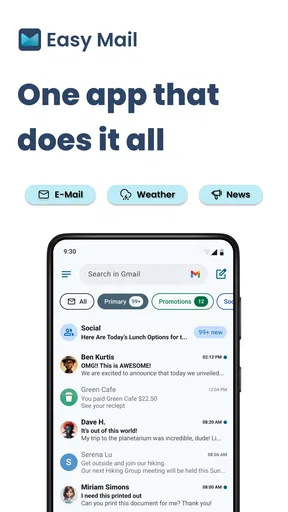
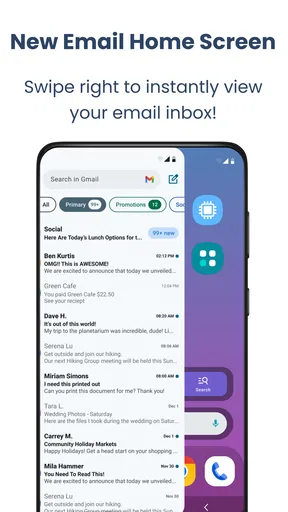
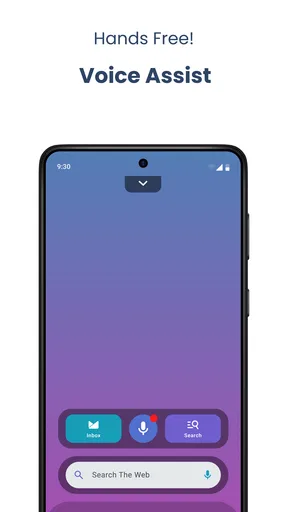
I think email apps are easiest to judge in the moments when you have only a few seconds to use them: checking a delivery update while making breakfast, replying to a school message between errands, or clearing a notification before it gets buried. Easy Mail is a personalization app built around making that everyday access feel lighter. Its approach is less about replacing email with a new way of managing everything and more about bringing the inbox closer to the home screen, with swipe access, a widget, and quick replies.
That focus makes Easy Mail interesting for shared-device households, though it also calls for clear boundaries. A phone or tablet that gets passed around is convenient, but an inbox is personal. I would treat the app as a shortcut to one person’s email rather than as a shared family mailbox or a coordination tool. Used that way, it can reduce the little bits of friction that make checking messages feel like a chore.
When a shortcut helps at home
Picture a parent using a phone while getting a child ready for school. A message arrives about a schedule change, and the parent wants to check it without opening a string of apps or navigating several screens. A home-screen widget can make that first glance easier, while quick replies can help with a short acknowledgment when a full response can wait. That is the sort of small, repeated convenience I find most appealing here.
The same setup may suit someone who uses email for household logistics: appointment reminders, receipts, delivery notices, or messages from a school or landlord. The benefit is not that the app magically organizes a busy household. It is that email may be easier to reach when it has a visible place on the home screen and a quicker route into the inbox.
There is an important distinction, though: easy access is not the same as shared access. If several people use one device, a widget or swipe gesture can make the mailbox more visible to whoever picks it up. I would not put an account on a communal tablet simply to make family coordination easier unless everyone using the device understands whose inbox it is and what may appear there.
For a household that genuinely needs several people to see the same messages, a dedicated shared mailbox or a calendar and task tool may be a better fit. Easy Mail’s described strengths are about getting to email and responding quickly, not about assigning household duties or managing multiple people’s responsibilities. That narrower purpose is useful, as long as expectations stay realistic.
Keep the account boundary clear
Before making email more prominent, I would decide which account belongs on the device and who is allowed to use it. That sounds obvious, but shortcuts change habits: a message that once required opening an app may now be visible from the home screen or reachable with a swipe. If the phone is personal, that can be a sensible convenience. If it is routinely handed to children, guests, or other family members, the same convenience deserves more thought.
I would also separate “helping someone check email” from “letting them reply as that person.” Quick replies are handy precisely because they reduce steps, but a fast response can be sent before the account holder has checked the full context. In a household, a brief reply such as confirming receipt may be low risk; answering a school, medical, financial, or work message on someone else’s behalf is a different matter. My practical rule would be to keep replies under the account owner’s control.
When setting up a shared device, try the layout in ordinary use before relying on it. Check whether the widget’s placement feels too exposed, whether the swipe route is easy to trigger accidentally, and whether other people can tell which account they are opening. These are not advanced configuration tricks; they are simple checks that help prevent a convenience feature from turning into an awkward privacy surprise.
If you use more than one email account, think through which one should be easiest to reach. A personal inbox and a work inbox may deserve different levels of visibility, even on the same device. The app’s central appeal is quick access, so putting the wrong account in the most convenient spot could create more distraction than benefit. I would start with the account that most often needs short, timely checks, rather than automatically connecting every mailbox to the same workflow.
Coordination without turning the inbox into a family hub
For coordinating plans, email is often the record of what was agreed, while a shared calendar or conversation is where people keep track of what happens next. Easy Mail may make it simpler for one person to find the original message and send a quick acknowledgment, but I would not rely on a home-screen shortcut to make everyone aware of a change. If a schedule update affects several people, the account holder still needs to pass it along through the channel the household actually checks.
A useful routine is to use the app for the first step, not the entire workflow. Glance at the email, decide whether it needs action, and then move important details into the family’s usual calendar, list, or group conversation. That keeps a quick reply from becoming a substitute for sharing the information with everyone who needs it. It also reduces the chance that a message gets answered but the actual appointment or task is forgotten.
There is a trade-off in making email more accessible: it can help you catch a time-sensitive note, but it can also encourage checking the inbox whenever you unlock the phone. I would place the widget where it is convenient without letting it dominate the screen, and use quick replies for genuinely quick responses rather than turning every message into an immediate interruption. People who want a calmer, more deliberate inbox routine may prefer opening their regular mail app only at set times.
Another sensible use is helping an older relative who already owns and manages their account but finds the usual route into email fiddly. A visible shortcut and a simpler path to replies may make the routine less intimidating. I would still let that person choose the account and decide what appears on the home screen; the goal should be easier access, not taking over their communications.
Age, privacy, and the right kind of trust
The app is rated for Everyone, and that broad age label can be reassuring for families considering it on a device used around children. It does not, by itself, make an email account suitable for a child or mean that a shared inbox is private from other device users. Email can contain personal conversations and account-related messages, so I would make the decision based on the account owner, the device’s usual users, and the household’s own boundaries.
For a younger user, I would focus less on the app’s general age rating and more on who owns the mailbox and who can read or send messages from it. A child borrowing a parent’s phone should not be able to mistake the parent’s quick-reply option for permission to answer on their behalf. Conversely, if a young person has their own device and email account, the convenience may be useful, but the family should still agree on what privacy and supervision mean in practice.
Trust also depends on habits. A household can avoid confusion by naming the account owner aloud when handing over a phone, keeping work and personal messages distinct, and asking before replying from someone else’s inbox. Those small conventions matter more than any assumption that a personalization app can solve account-sharing concerns. Easy Mail helps make access convenient; the people using the device still need to decide what access is appropriate.
For adults who use a device alone, these concerns may barely arise. In that setting, the app’s main question is whether its shortcut-based style feels faster than the mail app already on the phone. If your existing email app opens quickly and its widget already does what you need, switching may not add much. If reaching the inbox is the part you dislike, Easy Mail’s emphasis on swipe access and a home-screen widget has a clearer reason to exist.
What the app offers, and what it costs to try
App Lab Studios makes Easy Mail for people looking for a more direct route into email, placing it in the personalization space rather than presenting it as a full household organizer. It is free to install, with in-app purchases ranging from $9.99 to $59.94 per item. I would try the basic experience against your own routine before considering any purchase, especially if your existing mail app already handles notifications and replies well.
The app has a 4.2 average from around 33,000 ratings, with about 8,500 written reviews, and has been installed over a million times. Those figures suggest it has found a sizeable audience, but they do not tell me whether its particular shortcuts will suit your device habits. For me, the more useful test is simple: do I reach email with fewer interruptions, and does that convenience remain comfortable on a device other people sometimes handle?
It was released on November 22, 2023, and the current version is 1.03.06. It requires Android 10 or later. That matters if you are planning to use an older phone as a household device: check its operating system before building a routine around the app. The age rating is Everyone, but the account itself still calls for the same privacy judgment as any other email service.
Compared with a conventional email app, Easy Mail’s appeal is the access layer: a widget and swipe-oriented entry can make checking feel more immediate. A standard mail app may be preferable if you want to stay with a familiar interface or already have a reliable widget and reply workflow. A dedicated shared mailbox is more suitable when several adults need to handle the same incoming messages. The right choice depends less on which app has more shortcuts and more on whether the account is personal or genuinely shared.
Who I would recommend it to
I would recommend Easy Mail to someone who checks email frequently but wants a quicker way to get into the inbox, especially if short replies and home-screen access are part of the daily routine. It may also suit an adult who is helping a relative make an existing email habit easier, provided the account owner remains in charge of the device and responses. The useful gain is modest but tangible: fewer steps between noticing a message and deciding what to do with it.
I would skip it if your main goal is household task assignment, a jointly managed family inbox, or stronger separation between multiple users. I would also be cautious on a communal device where messages could appear in view of people who should not see them. In those cases, a shared account designed for the group, a separate device profile, or simply keeping email inside the account owner’s usual app may be the more sensible option.
My household verdict is that this is a focused convenience app, not a family communications system. Its best role is to make one person’s email easier to reach while leaving the responsibility for privacy, replies, and coordination with that person. If that boundary matches how you use your phone, Easy Mail is worth trying; if the real problem is getting several people to coordinate, I would choose a tool built around shared plans instead.
Pros and cons
Pros
- Quickly opens your inbox from a lightweight launcher.
- Useful for reaching email without searching through app folders.
- Simple layout makes its main function easy to understand.
- Can complement the email app you already use.
- Handy for users who check email frequently.
Cons
- It is a launcher shortcut rather than a full email client.
- Features depend on the email app installed on your device.
- It may offer little value if email is already easy to access.
- It does not replace a dedicated email app for managing messages.
- Availability and compatibility may vary across devices.


